Desktop App vs Web App vs Mobile App
A desktop app is software you install on your computer, like Microsoft Word or Photoshop.
A web app runs in your internet browser, like Google Docs or Gmail. A mobile app is designed for phones and tablets, downloaded from an app store. Each type has strengths and trade-offs depending on how you want to use it.
What it looks like
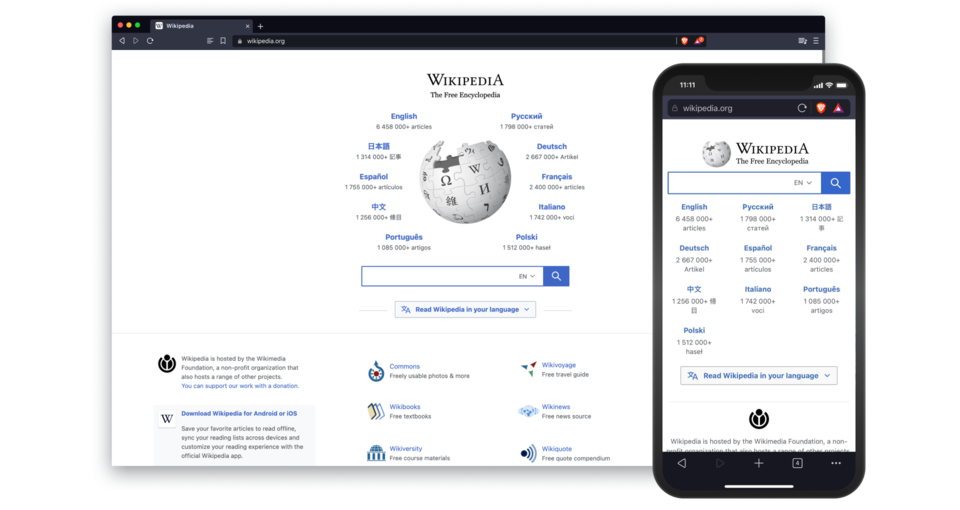
Desktop App vs Web App vs Mobile App, explained at three levels
At home
Desktop apps are programs you install directly on your computer, and they usually work even without the internet. Web apps are websites that function like programs: you use them through your browser without installing anything. Mobile apps are designed specifically for your phone or tablet and are downloaded from an app store. Many popular services offer all three types so you can use them wherever you are.
At work
In a business setting, choosing between desktop, web, and mobile apps depends on your team's needs. Desktop apps often offer the most powerful features, web apps provide easy access from any device with a browser, and mobile apps keep field teams connected on the go. Many modern business tools are web-first, reducing the need for IT to manage installations on individual machines. A hybrid approach often works best for organizations with diverse teams.
At home
Desktop apps run natively on an operating system and can access hardware resources directly, offering superior performance for demanding tasks. Web apps use browser technologies like HTML, CSS, and JavaScript, making them platform-independent but dependent on internet connectivity. Mobile apps are built for specific platforms like iOS or Android using native SDKs or cross-platform frameworks. Progressive web apps blur the line by offering app-like experiences through the browser.
At work
From an enterprise perspective, the desktop-web-mobile decision impacts deployment strategy, support costs, and user experience. Web apps simplify updates since changes deploy centrally without touching user devices. Desktop apps may be necessary for power users who need offline access or high performance. Mobile app development doubles the effort if you need to support both iOS and Android natively, though cross-platform frameworks can reduce this overhead.
At home
Technically, desktop apps can be built as native applications, Electron-based wrappers around web technologies, or cross-platform frameworks like Qt or .NET MAUI. Web apps range from server-rendered pages to single-page applications with client-side routing and state management. Mobile development choices include native Swift or Kotlin, cross-platform frameworks like React Native or Flutter, and hybrid approaches using WebView. Each architecture has implications for performance, maintainability, and talent availability.
At work
At the architecture level, modern applications often adopt a shared backend with platform-specific frontends, using APIs to synchronize data across desktop, web, and mobile clients. Offline-first design patterns with data synchronization address connectivity challenges across all three platforms. Micro-frontend architectures allow teams to develop and deploy components independently. The choice between native and cross-platform approaches involves trade-offs in user experience fidelity, development velocity, and long-term maintenance costs.
Real-world examples
At home
Sophie uses the desktop version of Spotify on her laptop for the best audio quality while working from home. When she is out shopping, she uses the mobile app on her phone. If she is at a friend's house and wants to show a playlist, she opens the Spotify web app in their browser without installing anything.
At work
Marcus manages a sales team spread across offices and field locations. The team uses a desktop CRM app at their desks for detailed data entry, the web version when working from client offices on borrowed laptops, and the mobile app for quick updates between meetings. This multi-platform approach ensures everyone stays connected.
How it compares
| Feature | Desktop App | Web App | Mobile App |
|---|---|---|---|
| Installation | Installed on computer | No installation needed | Downloaded from app store |
| Internet required | Often works offline | Usually requires internet | Varies by app |
| Performance | Typically highest | Depends on browser and connection | Optimized for mobile hardware |
| Updates | Manual or auto-update | Automatic, server-side | Through app store |
| Access | One computer only | Any device with a browser | Phone or tablet |
| Examples | Photoshop, Excel | Google Docs, Trello | Instagram, Uber |
Desktop apps offer power and offline use, web apps provide universal access through browsers, and mobile apps deliver on-the-go convenience. Many services now offer all three, so you can pick the right tool for the moment.
For analysts
When defining project requirements, always clarify which platforms your users actually need. Building for desktop, web, and mobile simultaneously triples the development and testing effort. Start with the platform your primary users rely on most, then expand. If you need all three, consider a web-first approach or cross-platform framework to keep costs manageable while still meeting user expectations.
History & origin
Desktop applications dominated the personal computing era from the 1980s through the 2000s. Web applications grew in popularity with the rise of broadband internet and technologies like AJAX in the mid-2000s, enabling rich browser-based experiences. Mobile apps exploded after the iPhone App Store launched in 2008, creating an entirely new category of software tailored for touch-screen devices.