App Store
An app store is an online marketplace where you can browse, download, and install software on your device.
The most familiar examples are Apple's App Store and Google Play Store for phones. Desktop computers also have app stores, like the Microsoft Store. App stores make it easy to find, install, and update software from one central place.
What it looks like
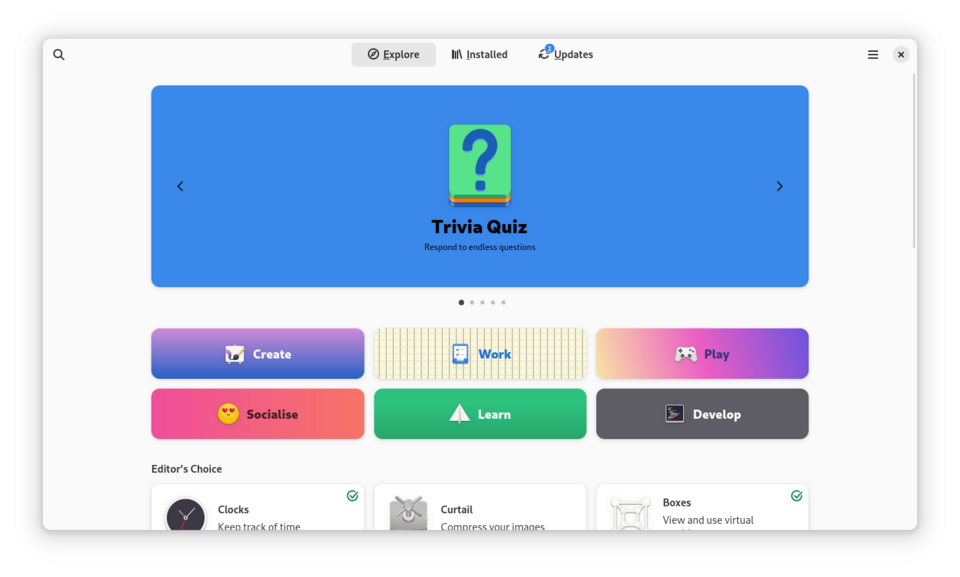
App Store, explained at three levels
At home
An app store is like a digital shopping mall for software. You search for what you need, tap a button, and the app installs automatically on your device. The store handles updates too, so your apps stay current without extra effort. Most phones come with an app store already installed, making it the easiest way to get new software.
At work
In a business context, app stores simplify software distribution for mobile workforces. Managed app stores or enterprise app catalogues allow IT departments to curate approved applications for company devices. This reduces the risk of employees installing unapproved or insecure software. Mobile device management tools often integrate with app stores to push required apps to employee devices automatically.
At home
App stores serve as intermediaries between developers and users, handling payment processing, digital rights management, and software delivery. Developers submit apps for review, and the store enforces guidelines around security, content, and privacy. App stores typically take a percentage of sales revenue, commonly around 15 to 30 percent. Sideloading (installing apps outside the official store) bypasses these protections.
At work
Enterprise app distribution strategies often combine public app stores with private enterprise stores or mobile application management platforms. Volume Purchase Programs let organizations buy app licences in bulk at discounted rates. App store policies impact which tools are available for corporate use, and IT must balance user needs with security requirements. App wrapping and containerization add security layers to store-distributed applications.
At home
From a development perspective, app store submission involves meeting platform-specific requirements for code signing, metadata, privacy disclosures, and API usage. Review processes can vary in duration and strictness between platforms. Developers use app store analytics to track downloads, user engagement, crash rates, and revenue. Continuous delivery pipelines can automate the build-test-submit cycle for app store releases.
At work
At the strategic level, app store ecosystems influence platform choice and vendor relationships. App store monopoly concerns have led to regulation such as the EU's Digital Markets Act, which since 2024 has forced Apple to allow alternative app marketplaces in Europe. Organizations developing customer-facing apps must consider app store fees, review timelines, and policy changes as business risks. Progressive web apps offer an alternative distribution model that bypasses app stores entirely.
Real-world examples
At home
Lena wants a recipe app for her phone. She opens the App Store, searches for 'recipes,' reads reviews, and installs a highly rated free app with one tap. A week later, the app store notifies her that an update is available, and she taps to install the latest version.
At work
Jerome, an IT administrator, uses his company's managed app catalogue to push a secure messaging app to all employee phones. Employees see the app appear in their enterprise app store and install it with one tap. Jerome can track which devices have installed the app and ensure everyone is on the latest version.
Common confusions
- A lot of people believe app stores only have phone apps. Desktop operating systems like Windows and macOS also have app stores for computer software.
- You might think everything in an app store is safe. While stores have review processes, malicious or misleading apps occasionally slip through.
- It's often assumed that you must use an app store to install software. You can often download software directly from a developer's website, though this may carry more risk.
For analysts
When planning a mobile app project, factor in app store review timelines and policies from the very beginning. Apple and Google have specific requirements for privacy disclosures, accessibility, and data handling that can affect your feature list. Build these constraints into your requirements early rather than discovering them during submission. If your app targets enterprise users, explore managed distribution options that bypass public store limitations.
History & origin
Apple launched the App Store in July 2008 alongside the iPhone 3G, forever changing how software is distributed. Google followed with the Android Market, later rebranded as Google Play. These centralized marketplaces replaced the older model of downloading software from individual websites, bringing convenience and a layer of security review to software distribution.