Blue Screen of Death (BSOD)
The Blue Screen of Death, or BSOD, is a full-screen error message that appears on Windows computers when something goes seriously wrong at the system level.
Your screen turns blue (black on Windows 11 since a 2025 update), displays an error code, and the computer restarts. It means Windows encountered a problem so severe that it could not keep running safely. While alarming, it is usually fixable and often caused by driver issues, hardware problems, or faulty updates.
What it looks like
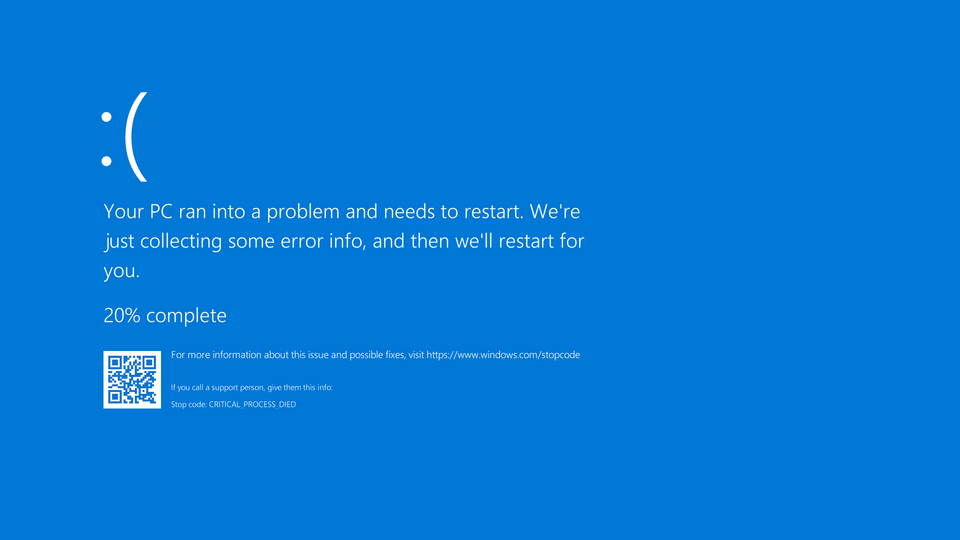
Blue Screen of Death (BSOD), explained at three levels
At home
The Blue Screen of Death is what happens when Windows runs into a problem so serious that it has to stop everything and restart. Your screen turns blue (or black on an up-to-date Windows 11 PC), shows an error message, and then your computer reboots. It can be scary the first time you see it, but it usually means something like a driver problem or a bad update, not that your computer is destroyed. If it only happens once, it is usually nothing to worry about.
At work
In a business context, a BSOD on an employee's computer means immediate lost productivity and potentially lost unsaved work. IT support teams track BSOD occurrences to identify patterns: frequent BSODs across multiple machines may indicate a bad driver update or hardware batch issue. The error codes displayed on the blue screen help technicians diagnose the root cause. Organizations with proactive monitoring can detect BSOD trends before they become widespread problems.
At home
A BSOD occurs when the Windows kernel encounters a fatal error that it cannot recover from, known as a bug check or stop error. Common causes include faulty kernel-mode drivers, hardware failures like bad RAM, corrupted system files, and overheating. Windows writes a memory dump file during the crash that contains diagnostic information. The stop code displayed on the blue screen (such as IRQL_NOT_LESS_OR_EQUAL or SYSTEM_SERVICE_EXCEPTION) narrows down the category of failure.
At work
Enterprise BSOD management involves centralized collection and analysis of crash dump files across the device fleet. Windows Error Reporting automatically submits crash data to Microsoft, and organizations can also collect these dumps internally. Patterns in stop codes and faulting modules help IT teams identify problematic drivers, hardware models, or software combinations. Automated BSOD monitoring and alerting enables rapid response before problems spread to more devices.
At home
Technically, a BSOD triggers a bug check that halts all processor activity and writes the contents of physical memory to the pagefile for later analysis. The dump file, located at C:\Windows\MEMORY.DMP, can be analyzed using WinDbg or similar debugging tools. The faulting instruction, call stack, and loaded module list help identify the responsible component. Driver Verifier is a built-in tool that stresses drivers under controlled conditions to proactively identify instability before it causes a BSOD in production.
At work
At scale, BSOD analysis feeds into reliability engineering practices including hardware lifecycle management, driver certification programs, and change management processes. Organizations establish BSOD budgets (acceptable rates of occurrence per thousand devices) as part of their service level objectives. Root cause analysis of BSOD clusters often reveals systemic issues like incompatible firmware versions, supply chain defects in specific hardware batches, or regression bugs in Windows updates. Predictive analytics on pre-BSOD indicators, such as correctable memory errors, enable preemptive hardware replacement.
Real-world examples
At home
Nadia is working on her Windows laptop when the screen suddenly turns blue with a sad face and an error message. The computer restarts after a minute, and everything seems normal. She searches the error code online and discovers it was caused by an outdated graphics driver. After updating the driver, the problem never returns.
At work
Carlos, a systems engineer, notices five employees reporting BSODs on the same day. He collects the crash dump files and discovers they all reference the same printer driver that was updated the previous evening. He rolls back the driver to the previous version, and the BSODs stop immediately. He flags the issue with the printer manufacturer before reapplying any future updates.
Common confusions
- A lot of people believe a BSOD means the computer is permanently damaged. Most BSODs are caused by software issues like bad drivers and are easily fixable.
- One common misunderstanding is that BSODs only happen on old computers. Any Windows computer can experience a BSOD, including brand-new machines with incompatible drivers.
- Many people assume you should ignore a single BSOD. While one BSOD may be a fluke, it is worth noting the error code in case the problem recurs, so you can fix the root cause.
For analysts
If users report BSODs during the rollout of new software or hardware, treat it as a critical issue that needs immediate investigation. The stop code and timing of the BSOD relative to the change will tell you whether your deployment caused it. Include system stability as a measurable acceptance criterion: if a new tool causes even occasional BSODs, it is not ready for production. Work with IT to collect crash dumps for vendor escalation.
History & origin
Blue error screens first appeared in early 1990s versions of Windows, including Windows 3.1 and Windows NT 3.1, and became notorious with Windows 95. Early versions displayed cryptic error codes that only developers could interpret. Over the years, Microsoft has redesigned the BSOD multiple times, adding a sad face in Windows 8 and QR codes in Windows 10. In 2025, Windows 11 replaced it with a simpler black screen that drops the sad face and QR code. Despite improvements in system stability, the BSOD remains a recognized symbol of system failure.