Macro
A macro is a set of recorded or programmed instructions that automates a repetitive task on your computer.
Instead of performing the same clicks and keystrokes over and over, you create a macro once, and it does the work for you. Macros are commonly used in spreadsheet programs like Microsoft Excel, but they can work in many other applications too. They save time and reduce the chance of human error.
What it looks like
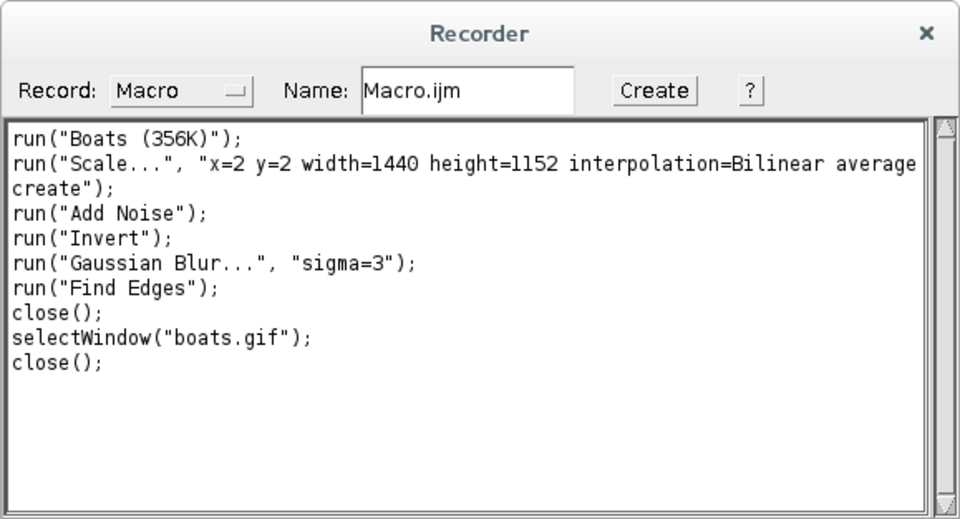
Macro, explained at three levels
At home
A macro is like teaching your computer a shortcut for a task you do over and over. Imagine you format a spreadsheet report the same way every week — you could record those steps as a macro and then run it with one click. The computer follows the exact same steps each time, saving you effort and preventing mistakes. You do not need to know how to code to use simple macros.
At work
In a business environment, macros are powerful productivity tools for automating routine data processing, report generation, and formatting tasks. Employees who learn to create basic macros in Excel or Google Sheets can save hours of repetitive work each week. However, organizations must establish security policies around macro use because macros can contain malicious code. Most companies disable macros from external sources by default.
At home
Macros can be created through recording, where the application logs your actions and replays them, or through scripting, where you write code in a language like VBA for Microsoft Office. Recorded macros capture exact sequences of actions, while scripted macros can include logic like loops, conditions, and error handling. Macros interact with the application's object model, which exposes elements like cells, worksheets, and documents as programmable objects.
At work
Enterprise macro management involves balancing productivity gains against security risks. Group policies can control macro execution settings — blocking macros from the internet, requiring digital signatures, or disabling macros entirely. Macro-enabled files should be stored in trusted locations defined by IT. Organizations benefit from maintaining a library of approved, tested macros for common tasks rather than allowing ad-hoc macro creation.
At home
Advanced macros leverage the full capabilities of their scripting language, including API calls, database connectivity, file system operations, and integration with external applications through COM automation or REST APIs. In Excel, Power Query and Office Scripts offer modern alternatives to traditional VBA macros with better security models. Macro performance optimization involves minimizing screen updates, using arrays instead of cell-by-cell operations, and managing memory efficiently.
At work
At the enterprise level, macro proliferation creates technical debt and operational risk when critical business processes depend on undocumented macros built by individuals. Organizations should audit macro usage, identify business-critical macros, and evaluate whether to migrate them to formal applications, RPA tools, or cloud-based automation platforms. Macro security policies must be enforced consistently across the organization, with exception processes for legitimate business needs.
Real-world examples
At home
Helen manages a household budget spreadsheet and spends 20 minutes each month formatting and summarizing the data. She records a macro that applies her preferred formatting, inserts summary formulas, and creates a chart. Now she runs the macro each month with one click and finishes in seconds.
At work
Andre works in finance and generates weekly sales reports from raw data exports. He writes an Excel macro that cleans up the data, applies currency formatting, calculates totals, and creates a summary table. What used to take an hour of manual work now takes 30 seconds, and the results are consistent every time.
Common confusions
- A frequent misconception is that macros are only for advanced users. Most spreadsheet programs let you record a macro by simply performing the task once while the recorder is on.
- A lot of people believe macros are always dangerous. Macros you create yourself are safe. The risk comes from running macros from unknown or untrusted sources.
- Many people assume macros only work in Excel. Macros can be used in many applications including word processors, email clients, and even some web applications.
For analysts
When you discover that business users have created macros to work around system limitations, pay attention — those macros often reveal unmet requirements. Document what the macros do and why they were created. If a macro is critical to a daily workflow, it should either be built into the formal system or replaced with a supported automation tool. Unmanaged macros are a hidden risk that can break without warning.
History & origin
Macros originated in the early days of computing as a way to abbreviate sequences of commands. In the 1980s and 1990s, spreadsheet programs like Lotus 1-2-3 and Microsoft Excel popularized macros for business users. Microsoft introduced Visual Basic for Applications in 1993, making macro programming accessible to non-developers. The power of macros has also made them a vehicle for malware, leading to the security restrictions on macro execution that exist today.